> For the complete documentation index, see [llms.txt](https://henull.gitbook.io/en/llms.txt). Markdown versions of documentation pages are available by appending `.md` to page URLs; this page is available as [Markdown](https://henull.gitbook.io/en/support-center/product-manuals/how-to-switch-profiles-in-adobe-creative-cloud-desktop.md).
# How to switch profiles in Adobe Creative Cloud Desktop?
### Method 1
1. Open the Adobe Creative Cloud Desktop application.
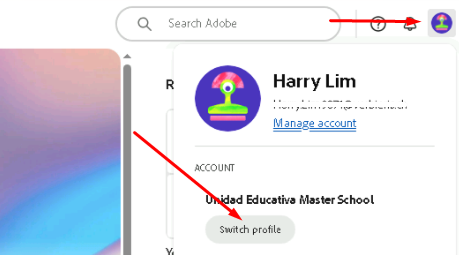
2. Click on your profile icon in the top right corner then click on `Switch profile`
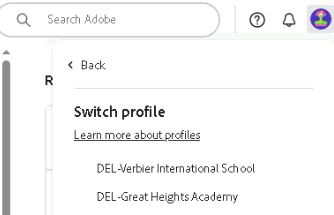
3. Select the appropriate Adobe profile depending on which organization's apps and services that you want to use.
### Method 2
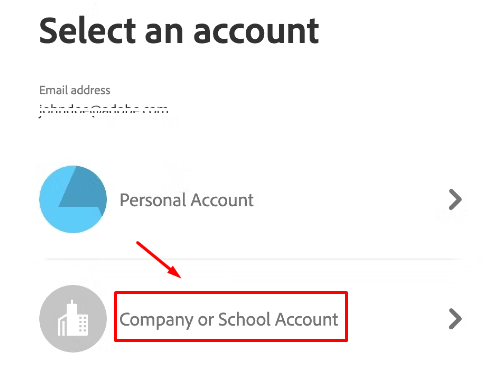
1. Sign out and sign back in. After entering your credentials, the Profile chooser will display. Select `Company or School account`
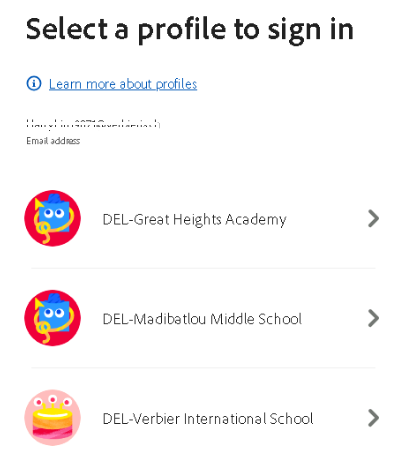
2. Select the appropriate Adobe profile depending on which organization's apps and services that you want to use.